
If you’re planning a smart home project, you’ll hit this fork in the road early: build your home automation systems on wired infrastructure, or lean on wireless protocols like Wi-Fi, Zigbee, and Z-Wave. Both approaches work well when installed correctly. Neither one is universally better. The right choice depends on your home’s construction, your budget, and what you actually want the system to do.
This guide walks through how each approach performs in real installations, where the cost and reliability trade-offs actually show up, and how to decide which one fits your project.
What “Wired” and “Wireless” Mean in Home Automation Systems
Before comparing the two, it helps to be precise about what each term actually covers, since marketing around smart homes blurs the line constantly.
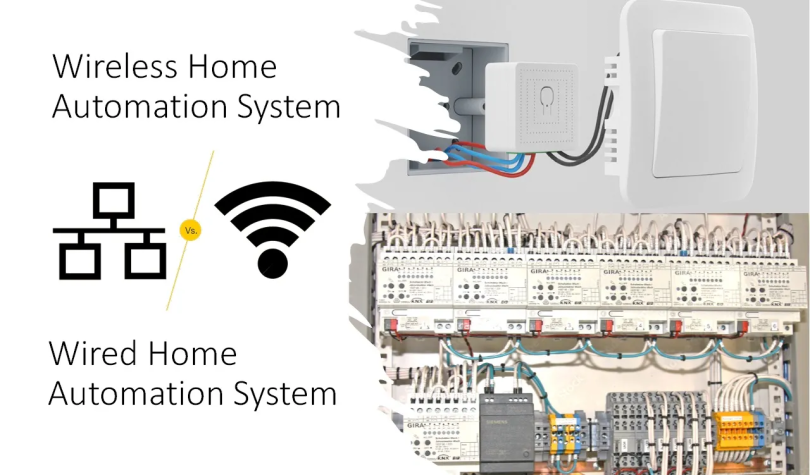
A wired home automation system runs low-voltage cable, usually Cat6 or a similar structured cabling standard, from a central panel or rack out to each keypad or device. The devices themselves don’t transmit over radio frequency; they communicate over the cable itself. Lutron’s HomeWorks line, Control4’s wired touch panels, and most whole-home audio distribution setups follow this model.
A wireless system uses radio protocols instead of cable to move commands between devices and a hub or router. Wi-Fi, Zigbee, Z-Wave, Thread, and Bluetooth Low Energy cover most residential use. A smart plug, a battery-powered door sensor, and a video doorbell are wireless by design; running cable to most of them isn’t realistic anyway.
One thing we regularly notice on walkthroughs is that homeowners assume “smart home” automatically means wireless. It doesn’t. The most reliable installations we’ve seen usually mix both, and deciding which protocol handles which device is where most of the planning time actually goes.
How Wired Systems Perform in Real Homes
Where Wired Systems Win
A wired system has one structural advantage no wireless protocol can fully match: a dedicated physical path for every signal. That means no dropped packets from a neighbor’s Wi-Fi, no battery to replace in a sensor buried inside a wall, and no dependency on your home network staying online.
For lighting control in larger homes, wired keypads and dimmers remain the standard most integrators reach for first. A wired lighting scene fires the instant you press the keypad, with no radio handshake in between. In a 6,000 square foot house with 40-plus lighting zones, that difference shows up every day, not just in an edge case.
Where Wired Systems Fall Short
The obvious drawback is labor. Running cable through finished walls means opening drywall, fishing lines through joist bays, and patching afterward, unless the home was pre-wired during construction. That adds real time and real cost to a retrofit, which is the main reason wired systems show up far more often in new construction than in renovations.
A mistake people commonly make is assuming a wired system is automatically future-proof because it’s wired. Cable standards change over time. Cat5e installed 15 years ago often can’t handle the bandwidth some current AV distribution systems need. Wired doesn’t mean maintenance-free; it means a different kind of maintenance.
How Wireless Systems Perform in Real Homes
Strengths
Wireless is the reason retrofits are feasible for most homeowners in the first place. A Zigbee or Z-Wave sensor can go into an existing home in minutes, with no wall access required. That flexibility explains why wireless technology has become the dominant approach across the broader home automation market, with US household smart home penetration tracking toward roughly 78% in 2025 according to industry research. For anyone renovating room by room instead of gutting a house at once, that matters.
Wireless also scales down well. Adding three smart plugs and a video doorbell doesn’t require a full system plan. It just requires an app and a decent router.
Weaknesses
The trade-off is signal reliability, and this is where most of the frustration actually comes from. Most consumer smart devices default to the 2.4 GHz radio band because it offers better range through walls, but that band only has three non-overlapping channels available in the US (1, 6, and 11), and Wi-Fi, Bluetooth devices, baby monitors, and microwave ovens all compete for that same space. Add a few dozen devices to one home network and you’ll notice it: laggy lighting scenes, locks that take a few extra seconds to respond, sensors that occasionally show as offline.
After working on many projects, we’ve found that the homes with the most wireless complaints are almost always the ones where every device, security sensors included, sits on the same 2.4 GHz Wi-Fi network as the streaming boxes and laptops. Splitting IoT traffic onto its own network, or moving sensors to Zigbee or Z-Wave instead of Wi-Fi, resolves most of it.
Wired vs. Wireless Home Automation Systems: A Side-by-Side Comparison
| Factor | Wired Systems | Wireless Systems |
| Installation in existing homes | Labor intensive; often requires opening walls | Fast; usually app-based setup |
| Best fit | New construction, whole-home lighting or AV | Retrofits, room-by-room additions |
| Reliability | Very high; no signal interference | Good, but affected by network congestion |
| Upfront cost | Higher, due to cabling and labor | Lower, hardware only |
| Scalability | Requires planning in advance | Easy to add devices later |
| Common points of failure | Cable damage, panel failure | Router downtime, battery drain, RF interference |
| Typical protocols | Structured cabling (Cat6), proprietary buses | Wi-Fi, Zigbee, Z-Wave, Thread, Bluetooth LE |
What It Actually Costs, and Where the Money Goes
Numbers vary a lot by market and project scope, but a few benchmarks are worth knowing before you set a budget.
On the professional integration side, CEDIA’s research on the US professional smart home industry puts the market near $30 billion, with integrator project sizes commonly running into the tens of thousands of dollars per home. That figure spans everything from a single wired lighting retrofit to a full home theater and whole-house automation build, so it’s a wide range, but it signals how much of this work still runs through professional installers rather than pure DIY.
If you’re unsure whether your home is a good candidate for a wired retrofit, a site walkthrough before you finalize a design is worth the hour. A home automation company in New York, for example, can usually tell within one visit whether your attic and crawl space access make wired lighting realistic, or whether a hybrid approach saves you a full day of drywall repair without costing much in reliability.
On the wireless side, ongoing savings can offset some of the lower upfront cost. ENERGY STAR-certified smart thermostats save the average household approximately 8% on heating and cooling costs, or roughly $50 a year, and that figure climbs for households that travel often, since geofencing catches empty-house periods a manual thermostat would miss entirely.
Reliability, Security, and Long-Term Maintenance
Security is where the wired-versus-wireless conversation gets more serious than lighting scenes and thermostat savings.
Wired security sensors remain standard in professional installations partly because a hardwired signal can’t be jammed the way a radio signal can. That’s not a theoretical concern. RF jammers built to block wireless sensor signals are cheap and easy to find online, and a wired contact sensor simply doesn’t share that failure mode.
That doesn’t mean wireless security is unsafe by default. NIST’s consumer IoT cybersecurity guidance sets out a baseline of security features, including regular software updates, data protection, and access control, that underpins the FCC’s voluntary Cyber Trust Mark labeling program for consumer devices. Looking for that label, or at minimum confirming a device receives regular firmware updates, is a reasonable substitute for going fully wired on non-critical devices.
On the hardware side, UL now tests products against the Matter interoperability standard, which major manufacturers including Amazon, Apple, Google, and Samsung have adopted for newer wireless devices, and which is projected to reach more than half of the world’s smart home devices within the next several years. Matter compatibility doesn’t fix RF interference, but it does lower the odds that a device turns into an orphaned, unsupported gadget a few years after purchase, which is its own kind of long-term reliability problem.
In real installations, we tell clients to treat “wireless” and “insecure” as two separate questions. A well-configured wireless network with segmented IoT traffic and current firmware is a reasonably secure setup. A wired system with a default admin password on the control panel isn’t automatically safer just because the signal travels through copper instead of air.
Choosing Between Wired and Wireless: A Practical Checklist
Work through these questions before committing to a design:
● Is the home still under construction, or would you need to open finished walls to run cable?
● Which systems genuinely need the highest reliability: security, access control, whole-home audio?
● What’s the realistic budget split between labor and hardware?
● How many devices do you expect to add over the next two to three years?
● Does your router support segmenting IoT traffic onto its own network?
● If you plan to sell within five years, does the buyer pool in your area value a wired system?
● Do you have attic, basement, or crawl space access that makes a partial wired retrofit realistic?
Comparing these questions against real project photos rather than spec sheets helps too. Browsing a home automation hub with finished installations shows how integrators actually split wired and wireless devices in comparable homes, instead of guessing from a product catalog.
Common Mistakes Homeowners Make
● Going all-wireless in a large home without segmenting the network. Every device sitting on one flat 2.4 GHz network is the single biggest cause of the lag and dropout complaints installers hear most often.
● Wiring a home for lighting while forgetting future AV needs. Cat5e run today may not handle the bandwidth of a video distribution system installed five years from now, and Cat6 is worth the small cost difference upfront.
● Choosing a protocol based on one device instead of the whole system. A great smart lock doesn’t mean its underlying protocol is the right backbone for your locks, sensors, and lighting together.
● Skipping the site walkthrough on a retrofit. Wall composition, attic access, and existing wiring vary enough between homes that a phone estimate rarely holds up once work starts.
● Assuming DIY installation covers everything. Individual devices are genuinely DIY friendly. Whole-home automation design, especially anything mixing wired and wireless backbones, is where professional experience pays for itself in avoided rework.
The distinction becomes especially important when multiple technologies need to work together across an entire property. Rather than treating each device as a separate project, professional home automation can bring lighting, climate, entertainment, security, and networking into a coordinated system designed around the home’s needs.
Conclusion
There’s no universal winner in the home automation systems wired versus wireless debate, and any guide claiming otherwise is oversimplifying. Wired systems earn their keep in reliability and are worth the labor cost in new construction or major renovations. Wireless systems earn their keep in flexibility and are usually the practical choice for retrofits and room-by-room upgrades. Most homes that work well over the long term end up as a mix of both, with wiring reserved for the systems where a dropped connection actually matters.
Frequently Asked Questions
Is a wired or wireless home automation system more expensive?
Wired systems typically cost more upfront because of cabling and labor, especially in a retrofit where walls need to be opened. Wireless hardware is usually cheaper per device, though total cost can climb once you’re adding many devices over time.
Can I mix wired and wireless devices in the same home automation system?
Yes, and most professionally designed systems do exactly that. A common approach wires the lighting and security backbone during construction or a major renovation, then adds wireless devices like smart plugs, cameras, and sensors afterward.
Does wireless interference actually affect smart home reliability?
Yes, particularly on the 2.4 GHz band, which Wi-Fi, Bluetooth, and household electronics like microwaves all compete for. Homes running many wireless devices on one network see more lag and dropped connections than homes that separate device traffic onto its own network.
Are wireless smart home devices secure?
They can be, provided the manufacturer follows current security practices such as regular firmware updates and encrypted communication. Checking for Matter compatibility or a Cyber Trust Mark label is a reasonable way to gauge whether a device meets a baseline security standard.
Should I choose wired automation for a home I plan to sell soon?
It depends on the local market. Wired lighting and security systems can be a selling point in higher-end homes, but the payback period is usually shorter with a hybrid system that mixes lower-cost wireless devices with wiring only where it matters most.