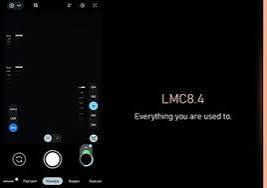

The camera has become one of the most important features of a modern smartphone. Android devices already include capable camera apps, but users who enjoy photography often look for additional controls and processing options. The LMC 84 APK File gives compatible Android users an opportunity to explore the LMC 8.4 camera and its customizable photography features.
LMC 8.4 is a GCam port designed to provide an alternative camera experience. Depending on the smartphone, it may offer advanced modes for portraits, nighttime photography, landscapes, and other shooting situations.
What Is LMC 8.4?
LMC 8.4 is a third-party camera application based on Google Camera technology. It is designed for Android devices that support the necessary camera features.
The main focus of LMC 8.4 is computational photography and customization. Users can experiment with different image-processing settings and camera modes to find results that match their preferences.
Unlike a manufacturer’s stock camera, LMC 8.4 is not specifically developed for one smartphone model. As a result, compatibility and performance can differ from one device to another.
Why Android Users Use LMC 8.4
Many users are attracted to LMC 8.4 because it offers additional flexibility. The standard camera app usually handles most image-processing decisions automatically, while a camera port can provide more options for users who want to experiment.
LMC 8.4 can also be useful for people who enjoy comparing different camera outputs. Depending on the device and configuration, users may notice differences in color, contrast, detail, and low-light performance.
Another useful feature is support for XML configurations, which can make advanced customization easier.
Popular Camera Features
HDR+ Technology
HDR+ is designed to improve exposure balance when a photograph contains both bright and dark areas. It can combine multiple frames to create a more evenly exposed final image.
It can be useful for outdoor scenes, landscapes, buildings, and photographs taken under challenging lighting.
Night Sight
Night Sight is intended for low-light photography. It processes multiple frames to create brighter images while attempting to retain useful details.
Performance varies depending on the smartphone sensor, lens, and settings. On supported devices, it can be useful for nighttime streets, indoor scenes, and other dark environments.
Portrait Photography
Portrait Mode is designed to emphasize the primary subject while adding background blur.
It is commonly used for people and close-up subjects. Adequate lighting and a suitable distance between the subject and background can help create a cleaner result.
Astrophotography
Astrophotography is designed for capturing stars and night landscapes on supported smartphones.
Long exposure requires stability, so placing the phone on a tripod or another steady surface can help reduce blur and unwanted movement.
RAW Image Support
RAW capture can be helpful for photographers who want to edit their photographs later. It provides more flexibility when adjusting exposure, colors, highlights, and shadows.
Not every device supports RAW capture in the same way, so availability depends on the smartphone.
LMC 84 APK File Compatibility
The LMC 84 APK File may require specific device capabilities to work correctly. Before installation, users should consider whether their smartphone meets the necessary requirements.
Important factors include:
- Android version
- Processor and chipset
- Camera2 API support
- Camera sensor
- Firmware
- Supported lenses
- Available system resources
A version that works smoothly on one smartphone may not behave the same way on another. Some devices may have problems with secondary cameras, while others may require additional configuration.
If the application does not start or certain features are unavailable, users should check whether the selected build is compatible with their device.
XML Files for Camera Customization
XML files are used to store predefined camera settings. They can help users configure LMC 8.4 without manually adjusting every available option.
A configuration can affect image processing elements such as color balance, contrast, sharpness, exposure, and noise reduction.
Because camera hardware differs between smartphones, it is best to use a configuration created for the same model whenever possible.
Users can test several compatible files and keep the one that provides the most pleasing results. Creating a backup of a working configuration is recommended before making additional changes.
Installing LMC 8.4 on Android
To install LMC 8.4, first download a compatible APK from a source you trust.
Once the file is downloaded, open your device’s file manager and locate the APK. Tap it to start the installation process.
Android may display a warning when an application is being installed from an external source. Carefully check the source before proceeding and only allow the installation when you are confident that the file is trustworthy.
After installation, open the camera application and grant the permissions necessary for camera access.
The exact installation process may differ depending on the phone manufacturer and Android version.
Tips for Getting Better Results
Before changing advanced options, take some test photos with the default settings. This provides a useful baseline for comparison.
Use HDR+ for scenes with significant differences between highlights and shadows. Night Sight can be useful in darker conditions, while Portrait Mode works well for subjects that can be separated from their backgrounds.
When testing astrophotography, avoid touching or moving the smartphone during the exposure.
If the colors or image processing are not to your liking, experiment with a suitable XML configuration. Make one change at a time so you can understand its effect.
LMC 8.4 Compared With the Stock Camera
The stock camera is usually optimized for the smartphone’s hardware and offers a straightforward user experience. It is generally ready to use without additional setup.
LMC 8.4 is more focused on customization. It can provide additional controls and settings for users who want to experiment with their camera.
For quick everyday photos, the default camera may be more convenient. For users who enjoy photography and customization, LMC 8.4 may offer more room for experimentation.
The actual image quality depends on the device, lighting conditions, camera hardware, and selected settings.
APK Safety Considerations
Installing third-party applications requires some caution. Users should verify the source of an APK before downloading or installing it.
Avoid suspicious websites and files that request unnecessary permissions. Check that the application is suitable for your Android version and smartphone.
It is also a good practice to keep your device’s security protections enabled when installing applications from outside official app stores.
Conclusion
LMC 8.4 is an alternative camera option for Android users who want additional photography features and customization. Depending on the smartphone, it can provide useful tools such as HDR+, Night Sight, Portrait Mode, astrophotography, RAW capture, and XML configurations.
Since every Android device has different hardware and software, compatibility should be checked before installation. A suitable version and device-specific configuration can help provide better performance.
For smartphone photography enthusiasts who enjoy testing different camera settings, LMC 8.4 can be a flexible and interesting option.