Let’s be real—technology has come a long way, and while it’s a thrill for the younger generation, it can feel overwhelming for our beloved seniors. But that doesn’t mean they should be left behind. In fact, it’s more important than ever to keep them connected, safe, and empowered in the digital age. Whether it’s staying in touch with family through video calls, managing medications with apps, or simply enjoying a puzzle game to keep the mind active, the right device can make a world of difference.
That’s where smartphones for seniors come into play—not just any phones, but thoughtfully designed ones that cater specifically to their needs, preferences, and comfort. Let’s explore the world of smartphones that aren’t just smart—they’re senior-smart.
Understanding the Needs of Senior Smartphone Users
Why Seniors Need Tailored Devices
Older adults often experience unique challenges that the average smartphone doesn’t address. From declining vision to hearing loss and reduced dexterity, technology can become more of a hurdle than a help—unless it’s designed with these considerations in mind.
Key Features to Consider
- Large Displays and Fonts: Ensuring readability without eye strain
- Loud, Clear Audio: Especially for those with hearing impairments
- Simple User Interfaces: Less clutter, larger icons, and intuitive layouts
- Emergency Features: One-touch SOS buttons and medical ID access
- Long Battery Life: Reduces the hassle of frequent charging
- Physical Buttons: For those who prefer tactile feedback over touchscreens
Latest 2025 Smartphone Models Designed for Seniors
1. Jitterbug Smart4 by Lively
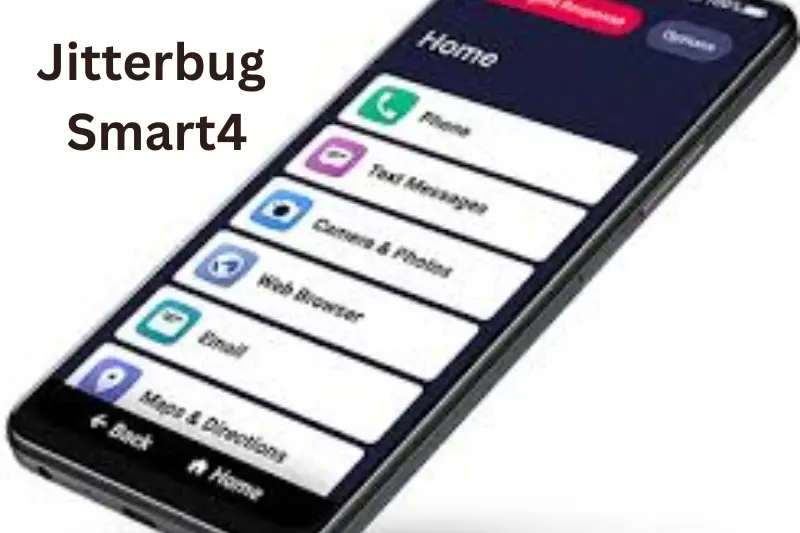
One of the most popular phones for seniors in 2025, the Jitterbug Smart4 is user-friendly and packed with essential safety features.
Highlights
- 6.75-inch screen with extra-large icons
- Voice-activated assistant with simplified commands
- Built-in 24/7 emergency response button
- Health and safety monitoring apps included
- Hearing aid compatibility (M4/T4 rating)
- Affordable monthly plans without contracts
2. Samsung Galaxy A15 5G (Senior Edition)
Samsung introduced a modified version of its popular A-series for older adults with enhanced accessibility settings.
Highlights
- One UI Easy Mode: Larger text and simplified home screen
- Long-lasting 5000mAh battery
- Adaptive sound for clearer calls
- Facial recognition for quick unlocking
- Tutorial mode to guide new users
3. iPhone SE (2025 Edition)
Apple continues to offer accessibility-rich features in a compact, powerful package.
Highlights
- VoiceOver and Magnifier apps built-in
- Siri voice assistant for hands-free navigation
- Retina display with adjustable zoom and contrast
- Emergency SOS via side button
- Seamless integration with Apple Health and medical apps
Operating Systems: Which One Works Best for Seniors?
Android vs. iOS: Breaking It Down
Each operating system has strengths depending on what a senior values most. Here’s how they stack up.
Android Pros
- Greater variety of phones at different price points
- Customization for interface simplicity
- Google Assistant is intuitive and useful
Android Cons
- Inconsistent user experience across brands
- More potential for unnecessary apps or bloatware
iOS Pros
- Consistent interface across all iPhones
- Highly refined accessibility features
- Excellent customer support and community forums
iOS Cons
- Limited hardware choices
- Higher cost of entry
Apps That Make Life Easier for Seniors
Communication and Connection
- WhatsApp / FaceTime / Google Duo: Easy video calling options
- Facebook: Stay connected with family and community updates
- Messages with Voice-to-Text: Simplifies texting without typing
Health and Safety
- Pill Reminder: Keeps track of medication schedules
- Emergency SOS App: Instant alerts sent to emergency contacts
- Medical ID: Shows vital health data on the lock screen
Entertainment and Mental Wellness
- Lumosity / Elevate: Brain training games to keep minds sharp
- Spotify: Favorite music at fingertips with large controls
- Kindle / Audible: Reading and audiobooks made accessible
Accessories That Enhance the Experience
Must-Have Add-Ons for Senior Comfort
- Stylus Pens: For those who prefer not using fingers
- Protective Cases with Grips: Easy to hold and reduces drops
- Wireless Charging Docks: No fumbling with tiny cables
- Bluetooth Hearing Aids: Sync directly with smartphones for clearer sound
- Screen Magnifiers: Add-on lenses for larger, clearer displays
Buying Guide: How to Choose the Right Smartphone for Seniors
Factors to Consider
Ease of Use
- Look for minimal bloatware and a clean interface
- Devices with “Easy Mode” or senior-friendly themes
Cost and Value
- Match the phone features with the senior’s actual needs
- Avoid overpaying for unused tech
Support and Learning Curve
- Brands with strong customer service are a plus
- Access to tutorials, manuals, or in-person support
Carrier Compatibility
- Make sure the phone works with the carrier’s network
- Unlocked phones offer greater flexibility
One read, and you’ll see things differently!
Discover the Best Remote Work Tools for Seamless Success
Top Sustainable Fashion Brands You’ll Adore Instantly
Life-Saving AI Applications in Healthcare
Tech News in Hindi That’ll Leave You Speechless Today!
Tips for Teaching Seniors to Use Smartphones
Be Patient, Supportive, and Encouraging
Helping a senior adapt to a new device isn’t just about explaining buttons—it’s about creating confidence.
Tips for Success
- Start with the basics like calling, texting, and camera use
- Use sticky notes with reminders for button functions
- Set up voice commands and shortcut icons
- Schedule mini sessions to build up skills gradually
- Celebrate their progress to boost motivation
Addressing Common Concerns and Questions
“What if I forget how to use it?”
- Many phones include tutorial apps or easy-to-access user guides
- Voice assistants like Google Assistant and Siri can help answer basic usage questions
“What if I can’t read the screen?”
- Phones offer large font modes, screen readers, and color contrast adjustments
“Is it safe to use a smartphone?”
- With built-in security features, biometric access, and app control, smartphones can be made secure with just a few settings
“How do I stay updated?”
- App updates are usually automatic if Wi-Fi is enabled
- Encourage family members to help with monthly check-ins
Real-Life Testimonials from Senior Users
Margaret, 72 – “It helped me stay in touch with my grandchildren.”
After struggling with her old flip phone, Margaret got a Jitterbug Smart4. “Now, I can video call my grandkids every weekend. I even joined a Facebook group for knitting!”
Ahmed, 68 – “Reminds me to take my meds on time.”
Ahmed uses his smartphone to manage his diabetes and medication schedule. “I get gentle reminders every morning and night. It’s been life-changing.”
Lucy, 75 – “It’s my little pocket helper.”
Lucy uses her iPhone SE to manage her calendar, control her smart home devices, and listen to audiobooks. “It makes my life easier and more fun.”
Smartphones vs. Feature Phones: What’s the Difference for Seniors?
Smartphones
- Advanced capabilities like apps, internet, and camera
- Great for seniors who want to stay active and engaged
- Require a learning curve but offer flexibility and control
Feature Phones
- Basic functions: calling, texting, and sometimes a simple camera
- Ideal for those who prefer a traditional phone experience
- Less chance of getting overwhelmed by tech
Best Carriers and Plans for Seniors in 2025
Lively Mobile Plans
- Specifically built for seniors
- Health and safety add-ons available
- No long-term contracts
T-Mobile 55+ Plans
- Unlimited talk, text, and data
- Discounted pricing for those 55 and older
- Free scam call blocking
Consumer Cellular
- Flexible plans and low prices
- Excellent U.S.-based customer service
- AARP member discounts available
Future Trends: What’s Next for Smartphones for Seniors?
AI-Powered Help
Smartphones are now including more AI assistants that not only understand commands but proactively remind, assist, and engage users.
Wearable Integration
Smartphones are syncing with smartwatches and health trackers to provide real-time updates, fall detection, and heart monitoring.
More Senior-Specific Devices
Brands are recognizing the need for age-inclusive tech and are launching models focused entirely on comfort, accessibility, and simplicity.
Final Thoughts
Empowering older adults with the right tools allows them to remain independent, stay connected with loved ones, and embrace modern conveniences with confidence. Today’s tech landscape is not just about faster processors or better cameras—it’s about inclusion. And nothing symbolizes that better than smartphones for seniors that are designed with heart, empathy, and real-life usability in mind. So, whether you’re helping your parent choose their first device or you’re a senior ready to explore the digital world—know that the perfect phone is out there, waiting to make life easier, safer, and more fun with just a tap or a swipe. Let technology serve, not stress—and let smartphones for seniors lead the way.
FAQs
What are the easiest smartphones for seniors to use?
Some of the easiest smartphones for seniors include the Jitterbug Smart4, Samsung Galaxy A15 5G (Senior Edition), and iPhone SE. These models offer simple interfaces, large icons, and helpful accessibility features.
Can seniors use smartphones for medical needs?
Yes, many smartphones support health apps that remind users to take medication, track health stats, and even contact emergency services quickly.
Are there smartphones that work well with hearing aids?
Absolutely. Devices like the Jitterbug Smart4 and iPhone SE are hearing aid compatible and offer clear, amplified sound with minimal distortion.
Do seniors need internet for smartphones?
While some features like calling and texting don’t require the internet, having Wi-Fi or mobile data allows access to apps, video calls, and online information, enhancing the overall experience.
How can I teach a senior to use a smartphone?
Start slow, focus on basic functions like calling and messaging, use visual aids, and encourage regular practice. Most importantly, be patient and supportive throughout the learning process.